How to Automate Business Processes: A Practical UK Guide
How to Automate Business Processes: A Practical UK Guide
To automate a business process, you map a repeated task, decide what starts it and what should happen next, then let software do the steps a person currently does by hand, with a person stepping in only when something unusual turns up. The hard part is rarely the software. It is choosing the right process, describing it properly and planning for the exceptions. I’m Joshua Adams-Peltier, and at TheAutoHaus I build operational systems and workflow automations for UK businesses, so this guide is written from the building side: what to automate, how to do it in order and where projects go wrong.
TL;DR
- Start with one process that is repeated often, follows clear rules and costs you real time, such as order entry, enquiry follow-up, invoicing or appointment confirmations.
- Map the current workflow before you choose any tool. Software built on a vague process automates the confusion.
- Plan for exceptions, handover and documentation from day one. Most disappointment with software comes from implementation, not the idea.
- Pilot one workflow, train the people who use it, then measure time saved and errors avoided before you add the next.
- For small service businesses, missed enquiries are the quickest win: TheAutoHaus’s Never miss a job setup is £295 one-off.
Table of Contents
- What it means to automate a business process
- Which processes to automate first
- How to automate a business process, step by step
- Choosing tools and software
- What it costs and how to measure the result
- A worked example: the unanswered enquiry
- Where TheAutoHaus fits
- A short checklist before you start
- FAQ
- Sources
What it means to automate a business process
A business process is any sequence of steps that happens the same way each time. A customer orders, someone checks stock, someone raises an invoice, someone books the courier. A student enquires, someone replies, someone sends a form, someone books a place.
Automating it means a system carries out the repeatable steps for you. Something triggers it (a form is submitted, an order lands, a payment clears). The system then moves the data to the right place, sends the right message or creates the right task, without anyone retyping or remembering.
You will see the same idea under several names: business process automation, workflow automation, automated workflows. They all describe the same thing at different scales. A single email that sends itself when an enquiry arrives is a small automated workflow. A connected system that takes an order from a website through production to dispatch is a larger one.
What automation is not: it does not remove the people. It removes the retyping, chasing and checking that keep good people from doing the work that needs judgement.
Which processes to automate first
The best candidates share four traits:
- They happen often, weekly or daily.
- They follow rules you could write on one page.
- They involve copying information from one place to another.
- A mistake or a delay costs you money or customers.
The Federation of Small Businesses lists data entry, invoice generation and appointment confirmations as repeatable small-business tasks worth considering. Here is how that looks in the sectors I work with most.
Small service businesses and trades
The first candidate is the enquiry. A call goes unanswered while you are under a car or with a client, and the person rings the next business on the list. Automating the first reply, capturing the details and prompting follow-up is usually the quickest return because it protects revenue you have already paid to attract. Invoicing and appointment reminders come next.
E-commerce
Order entry is the classic. If someone copies orders from a storefront into a spreadsheet, then into a courier portal, then into an accounting package, each hop is a chance for a typo and a delay. I wrote a separate guide on order entry automation and taking re-keying out of your orders that goes through the detail.
Logistics and production
Here the value sits in status. Where is this job, what is waiting on what, which orders are late? Automation can update statuses as work moves, flag anything stuck and tell the customer without someone writing the email. You can see how I have structured this kind of work in From order to dispatch and The systems behind the stock.
Education services
Schools, tutoring businesses and training providers repeat the same cycle: enquiry, information pack, booking, payment, reminders, follow-up. Each stage can be triggered by the one before it, with staff notified only when a decision is needed.
What to leave alone for now
Processes that change every week, that rely on judgement calls, or that you do not yet understand are poor first candidates. Fix the process on paper first. If two members of staff do the same job in two different ways, agree one way, then automate it.
How to automate a business process, step by step
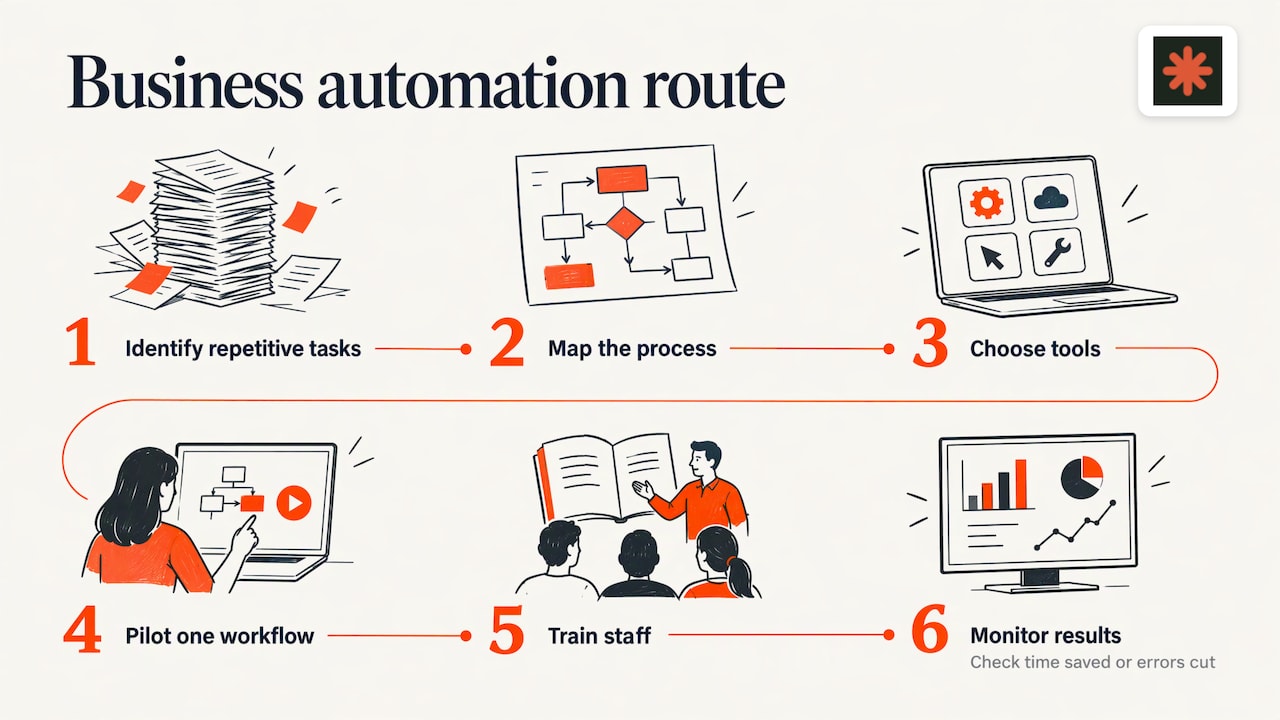
The FSB’s guidance sets out a six-step route: identify repetitive tasks, map the process, choose tools, pilot one workflow, train staff and monitor whether it saves the time or cuts the errors you expected. Here is the same route with the detail that decides whether it works.
1. Choose one process and put a number on it
Pick a single process. Write down how often it happens, how long it takes each time and who does it. Ten orders a day at six minutes of retyping each is an hour a day. That figure is your baseline, and you need it later to prove the automation worked.
Where this goes wrong: choosing “admin” as the process. It is too broad to build or to measure.
2. Map the workflow as it really runs
Walk through the process with the person who does it, not the person who thinks they do. Note every step, every system touched, every place information is typed in again, and every time someone says “unless”. Those “unless” moments are your exceptions: the order with a missing address, the customer who pays by bank transfer, the part that is out of stock.
Where this goes wrong: mapping the tidy version. The tidy version is what automation gets built on, then breaks on the first real order. This mapping step is where my operational background earns its place, because I build the system around how the people using it actually work.
3. Define the trigger, the data and the outcome
For each workflow, write three lines:
- Trigger: what starts it (a form submission, a paid order, a status change).
- Input: what information it needs and where that lives.
- Outcome: what should exist when it finishes (a record, an email, an invoice, a task).
If you cannot write these in three lines, the process is not ready or is really several processes.
4. Decide what happens when it goes wrong
This is the step most guides skip and the one that matters most in daily use. Decide in advance what the system does when data is missing, a connection fails or a case does not fit the rules. Usually the answer is to stop, flag it to a named person and show what is wrong. Projects I build include exception handling, practical documentation and handover, so the people who inherit the system know how it works and what to do when it flags a problem. My Exception Dashboard is an example of how that kind of visibility can look.
5. Build and pilot one workflow
Build the single workflow, run it alongside the manual method for a short period and compare the results. Keep the pilot small enough that a failure is an inconvenience, not a crisis.
6. Train the people and monitor
Show staff what the system does, what it will flag and what they still own. Then check your baseline from step 1: has the time dropped, have the errors fallen? Adjust, then move to the next process. Doing this one process at a time is slower than a big-bang rollout and far more reliable.
Choosing tools and software
There is a wide range of business process automation software, and the choice becomes simpler when you think in categories rather than brands. The FSB’s examples point to workflow connectors, accounting systems, CRM, email marketing, HR and payroll, and inventory software as the tool types that support small-business automation.
Think of it in layers:
| Layer | What it does | Example of the job |
|---|---|---|
| Where the data lives | A database or operations system holding orders, customers, jobs, stock | One record per order, visible to everyone |
| What moves the data | Integrations and workflow connectors that pass information between tools | Order from the storefront appears in the production view |
| What people use | Interfaces, dashboards and forms built around each role | A dispatch screen showing only what is ready to ship |
| What watches it | Alerts and exception handling | A message when an order has been stuck for a day |
Off-the-shelf tools cover many standard jobs well. A custom build earns its cost when your process does not fit a standard tool, or when several tools need to work as one. I build with Airtable, APIs, Node.js, n8n and Make, and what I choose depends on the job. If you are weighing up where your records should live first, my practical guide to database development for UK businesses will help.
Integration is where software purchases struggle
The numbers on software buying make the case for planning integration carefully. Capterra UK’s survey of 299 UK respondents, run in August 2025, found that only 27% reported no disruption or regret from a software purchase. Among buyers who regretted a purchase, 92% experienced implementation disruption and 33% of the disappointed buyers cited integration issues, according to the same report.
The lesson is not to avoid software. It is to treat implementation as part of the purchase: map first, connect deliberately, pilot, document and hand over properly. That is the work I put around each build.
What it costs and how to measure the result
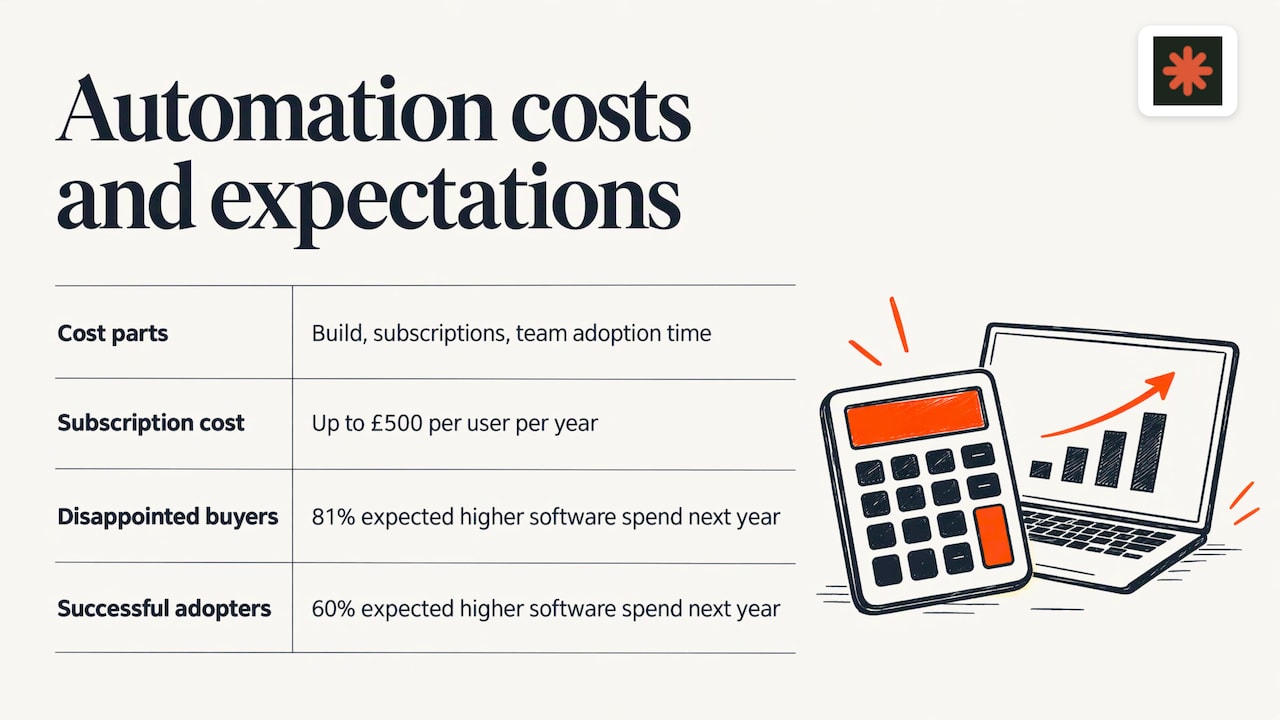
Costs come in three parts: the build, the tools you subscribe to and the time your team spends adopting it. Subscriptions matter more than people expect. The Productivity Institute’s November 2024 report on UK small firms found that participants saw cost as a barrier to scaling AI, with subscriptions built into productivity tools potentially costing up to £500 per user per year in the cases discussed. Add up per-user licences before you commit to a tool, not after.
The same Capterra research found that 81% of disappointed UK software buyers expected to spend more on software the following year, compared with 60% of successful adopters. A process that is well scoped and simply built tends to keep ongoing costs predictable, which is why I prefer to fix the scope before I price.
A simple way to measure it
Use your step 1 baseline and check three things after four to six weeks:
- Time: how many minutes does one run of the process take now?
- Errors: how many orders, invoices or messages needed correcting?
- Speed to customer: how long between the trigger and the customer hearing from you?
If none of the three has improved, the automation is not finished, whatever the dashboard says. Adjust it, or tell me what is happening and I will look at the workflow with you.
A caution on evidence: the Productivity Institute’s project worked with 15 UK small firms over five months and is a small participatory study, so treat its figures as illustration, not a promised return. Your own baseline is the benchmark that matters.
A worked example: the unanswered enquiry
Take a mobile mechanic who gets about eight enquiries a week by phone, text and web form. Half arrive while the mechanic is working. Today, they are written on a notepad and answered that evening, sometimes the next day.
Mapped properly, the process is:
- Trigger: an enquiry arrives by any channel.
- Input: name, number, what they need, preferred day.
- Outcome: the customer gets a reply straight away, the details land in one list and the mechanic is prompted to follow up.
- Exception: if details are missing, the system asks for them rather than guessing.
Nothing about this needs a large system. It needs a clear trigger, a reliable reply and one place where every enquiry ends up. The measure afterwards is simple: how many enquiries got a reply within minutes, and how many turned into booked jobs.
Where TheAutoHaus fits
If you run a trade, garage, clinic, salon or similar small service business and enquiries slip through, my Never miss a job setup is a fixed-price setup that catches every enquiry and replies instantly. It goes live in 5 working days and costs £295 one-off. An optional care plan is £35 per month.
For larger processes, such as order-to-dispatch flows, inventory, production or education-service workflows, I scope the work as a project: operations systems, workflow automation and web development built around the people who use them. You can see the approach on the TheAutoHaus homepage and in the portfolio, including An operating system for DTC. Projects include documentation, exception handling and handover, so you are not left depending on me to understand your own system.
Websites matter here too. Enquiry capture starts on the page where people find you, which is why I build responsive sites such as a valeting website and a clinic’s website with the follow-up connected behind them.
A short checklist before you start
- Can you describe the process in a trigger, an input and an outcome?
- Do you know how long it takes now and how often it runs?
- Have you listed the exceptions and decided who deals with each?
- Do you know where the data will live and who owns it?
- Have you counted the ongoing subscription costs per user?
- Is there a named person who will check the results after a month?
If you can answer yes to most of these, you are ready to build. If not, that is the work to do first, and it is work I can do with you.
FAQ
What does it mean to automate business processes?
It means setting up software to carry out the repeated steps of a task, such as moving order details between systems, sending confirmations or raising invoices, so a person does not have to. People remain involved for decisions and for cases the rules do not cover.
What should a small business automate first?
Start with a frequent, rule-based task that costs you time or customers. Enquiry replies, order entry, invoicing and appointment confirmations are common starting points. Choose one, measure how long it takes now, and automate that before anything else.
How is workflow automation different from business process automation?
In everyday use they overlap heavily. Workflow automation usually means connecting the steps of a specific task or flow, while business process automation can describe the wider set of processes across a business. For a small firm the practical approach is the same: map, build one workflow, test, then extend.
Do I need custom-built automation or will off-the-shelf software do?
Standard tools handle standard jobs. Custom work makes sense when your process has its own rules, or when several tools need to share data reliably. I scope each project around how your team works, and the fixed-price Never miss a job setup covers the common case of catching and answering every enquiry.
How do I know the automation has worked?
Compare against your baseline. Measure the minutes per run, the number of corrections needed and the time from trigger to customer reply, a few weeks before and after. If those have not improved, the workflow needs adjusting.
Sources
- FSB: Business process automation, a practical guide for small businesses
- Capterra UK 2026 Software Buying Trends Report
- The Productivity Institute: AI Catalyst, Cracking the code for MSME productivity (November 2024)