Order Entry Automation: How to Take Re-Keying Out of Your Orders

Order entry automation means an order is captured once, checked by rules and passed into your systems without anyone retyping it. People only step in when something does not fit. The technology is the easy part. The value comes from mapping how orders really reach you, deciding what counts as a valid order, and designing what happens to the ones that fail. That is operational design first and software second, which is how we approach it at The Autohaus.
This guide is for businesses that take orders by email, web form, spreadsheet, phone or message and want them to land in one tidy place: e-commerce stores, logistics firms, producers and suppliers, and education providers handling bookings and requests. It shows what the process involves, the checks that matter, how to roll it out safely and what it should cost you in time.
TL;DR
- Order entry automation captures an order once, validates it against your own data and creates the record in your system, leaving people to handle exceptions only.
- Most of the effort is in the rules: customer matching, product matching, price checks, duplicates and what to do when a check fails.
- Start with one order source or customer group, run it alongside the manual process, then widen it as accuracy is proven.
- A custom build on tools such as Airtable, Make, n8n and Node.js can be shaped around the way your team already works.
- Handover matters: documentation and clear exception handling keep the system running after the build.
Table of Contents
- What order entry automation actually covers
- Where orders come from, and why that decides the design
- What a validation step should check
- Design the exceptions before the happy path
- Getting data right matters beyond efficiency
- A worked example: what re-keying costs
- How to implement order entry automation, step by step
- Choosing between approaches
- What good looks like in practice
- Having us build it
- Common mistakes to avoid
- FAQ
- Sources
What order entry automation actually covers
Order entry is the moment an order becomes a record: the customer, the items, the quantities, the delivery address and the price are written into the system that runs your business. Done by hand, it is typing from one place into another.
It helps to separate it from the wider job. Order processing covers the tasks that move an order forward, such as confirming it, updating its status, shipping it and recording it in finance, while order management joins the whole journey together, from placement through inventory, fulfilment and returns. Entry sits at the front of that chain. Get it wrong and every later step inherits the mistake: the wrong item is picked, the invoice is off, the customer emails to ask where their parcel is.
Automated order entry usually does four things:
- Captures the order from wherever it arrives.
- Extracts the useful fields: who, what, how many, where to, by when.
- Validates those fields against your master data and rules.
- Creates the order in your system and notifies the right people, or routes it to a person if a check fails.
None of this requires an enterprise platform. A small distributor, an online shop selling through several channels and a college taking course requests all have the same shape of problem: information arrives in different forms and has to be turned into one clean record.
Where orders come from, and why that decides the design
The first question is not which tool to buy. It is where your orders come from today. A typical mix looks like this:
| Source | What arrives | Typical difficulty |
|---|---|---|
| Website or storefront | Structured data from a checkout or form | Low: already structured, but may need to reach stock and dispatch systems |
| Free text, PDFs, attached spreadsheets | High: every customer words things differently | |
| Phone or counter | Notes taken by whoever answered | Medium: depends on how consistently staff record them |
| Messaging apps | Short messages, sometimes photos of lists | High: ambiguous quantities and product names |
| Customer portals or partner files | Structured but in the partner’s format | Medium: needs mapping to your product codes |
Structured sources are straightforward to connect with APIs, which let one system pass data to another directly. The untidy sources, email and messages, are where most of the manual typing hides, and where rules and exception handling earn their keep.
The practical consequence: do not try to automate everything on day one. Count how many orders arrive through each channel in a normal month, estimate the minutes each takes to enter, and start with the channel where volume multiplied by effort is highest.
What a validation step should check
Capturing the data is half the job. The other half is knowing whether it is right. A sensible set of checks before an order is created looks like this:
- Customer match: is this a known customer, or a new one that needs setting up?
- Product match: does the item the customer described, or the part number they wrote, correspond to a product you actually sell? Customers often use their own names and codes, so you need a lookup that translates them to yours.
- Price check: does the price agree with the price list or the quote, within a tolerance you choose?
- Units and quantities: is it a box or a single item, kilos or grams? Is the quantity plausible for this customer?
- Delivery address: is it complete and consistent with what you hold?
- Duplicates: has the same order already arrived by another route, for example an email followed by a chaser?
- Arithmetic: do line totals and order totals add up?
The rule that holds the design together is simple: an order is created automatically only when every check passes. Anything else goes to a review queue where a person sees the original message beside the extracted data, fixes it and approves it. That is the difference between automation you can trust and automation that quietly puts bad data into your stock and accounts.
Design the exceptions before the happy path
Most projects spend their time on the orders that work. The ones that decide whether the system is useful are the orders that do not. Before building, write down what should happen when:
- a product cannot be matched,
- a price differs from the list,
- an address is missing,
- a customer is new,
- an order is unusually large,
- two sources send the same order.
For each case, decide who is told, how, what they can see and what they can do. A good exception queue shows the original order, the reason it stopped and a one-click way to correct and release it. It also records who approved what, so that any line can be traced back to the message it came from.
Expect the exception rate to be highest in the first weeks, while the system learns your catalogue and your customers’ habits. Every correction is useful: when someone fixes a customer’s nickname for a product, add it to the lookup so the same order sails through next time. This is why a staged rollout works better than a switch-over.
Getting data right matters beyond efficiency
Orders contain personal data: names, addresses, phone numbers. Under UK GDPR, the accuracy principle requires you to take reasonable steps to ensure the personal data you hold is accurate. A process that validates addresses and customer details at the point of entry, and keeps the original message alongside the record, supports that duty as well as saving time. If you are unsure how the rules apply to your particular business, speak to a data protection adviser.
A worked example: what re-keying costs
Take a supplier receiving 15 orders a day by email and phone, each taking five minutes to enter. That is 75 minutes a day, or around 312 hours a year across 250 working days. At an effective staff cost of £18 an hour, that is roughly £5,600 a year spent on typing, before counting the cost of corrections, the credit notes and the delays when something is mistyped.
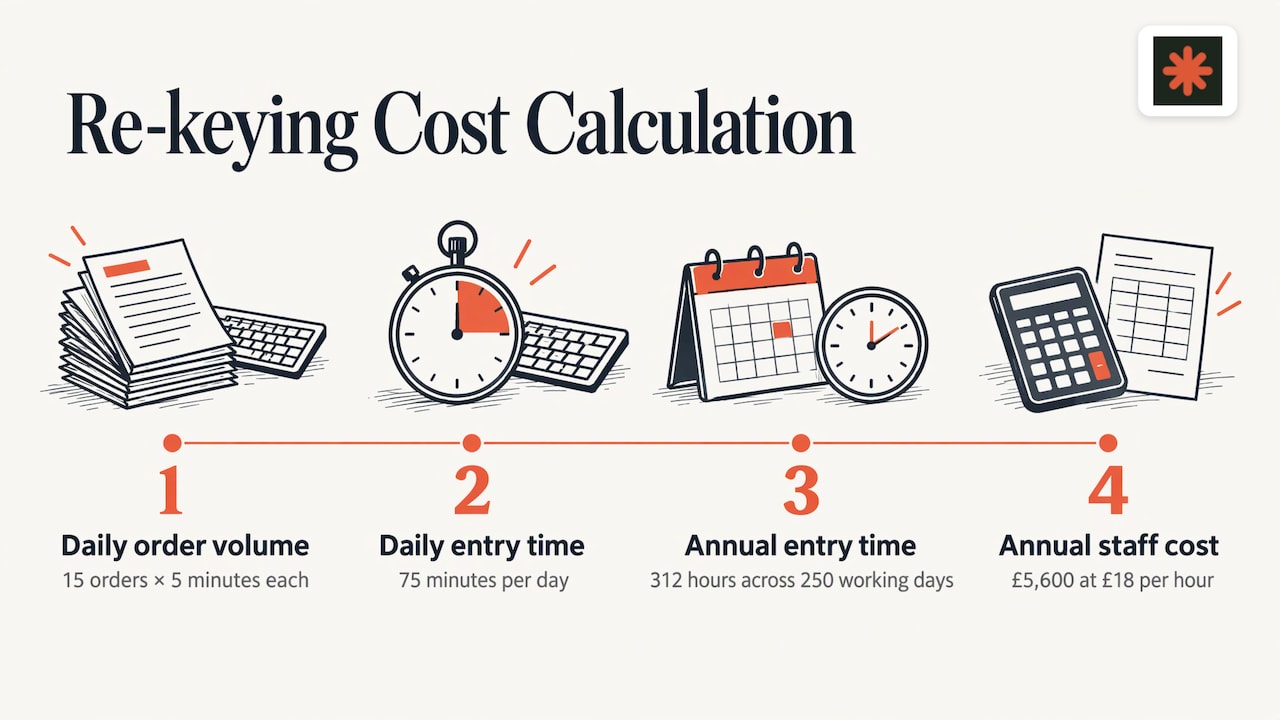
These figures are illustrative, so replace them with your own. Time a handful of real orders, multiply by your daily volume, and add the cost of the mistakes you can remember from the last quarter. The result tells you how much a project is worth, and it also tells you where to begin.
Savings are not only about hours. When order entry is no longer the bottleneck, the same team can handle more orders without more admin, answer customers faster and spend time on exceptions that need judgement.
How to implement order entry automation, step by step
1. Map the current process
Write down every step from the moment an order arrives to the moment it is dispatched or delivered: who touches it, which system they type it into and where it waits. Most delays and errors sit between steps, in the handoffs, not inside them. This is the part we do before any building: we map the work first, so the system is built around the people who use it.
2. Define your master data
Automation can only match what you have written down properly. Clean up your product list, customer list and price lists. Add the aliases customers actually use. Poor master data is the most common reason an otherwise sound automation produces exceptions.
3. Choose the system of record
Decide where orders live: a database such as Airtable, your e-commerce platform, an accounting package or a dedicated order system. Every other tool feeds this one. Having a single place that everyone trusts is what stops the same order being entered twice.
4. Build capture and extraction
Connect each source to the workflow. Web forms and storefronts can pass data straight in through APIs. Email, spreadsheets and PDFs need an extraction step to turn them into fields. Tools such as Make and n8n are well suited to joining services together, and Node.js code handles the cases where a ready-made connector falls short.
5. Add validation and routing
Implement the checks above and the rule that only fully passing orders are created automatically. Set a value or quantity ceiling above which every order is reviewed by a person, and make sure no order is created when a price, address or credit check fails.
6. Build the exception queue
Give staff a simple interface to review, correct and approve held orders. Keep it plain: the original order on one side, the extracted data on the other, a clear reason for the hold.
7. Run alongside the manual process
Test the automation against real orders in a test environment first. Then go live with one customer group or one channel, compare the automated entries with what staff would have typed and widen the scope only once accuracy is consistently good.
8. Document and hand over
Write down how the system works, what each rule does, what to do when an integration fails and who owns each part. Without this, the system depends on the memory of whoever built it. Our projects include practical documentation, exception handling and handover for exactly this reason.
Choosing between approaches
There is no single right way to feed orders into a business. The common approaches are:
- Direct integration through APIs, best where both sides can exchange structured data.
- EDI, an established format for high-volume exchanges with large trading partners, reliable but more costly to set up for each connection.
- Customer portals, suited to customers who order infrequently and will use a form.
- Template-based extraction, which works when a customer’s documents always look the same.
- AI-assisted extraction, which handles variable emails and attachments, with validation rules deciding what can pass unchecked.
These can run together. A business might take web orders through an integration, read emails through extraction and route anything doubtful to a person. The right mix depends on your customers: you rarely get to dictate how they order, so the system has to meet them where they are.
For a small or mid-sized business, the bigger question is fit. Generic order entry software is built around an average workflow. If your process has its own quirks, such as made-to-order items, custom pricing, courier rules or education bookings with their own approval steps, a system designed around those quirks tends to be easier for your team to adopt and to change as you grow.
What good looks like in practice
Our order-to-dispatch project for an apparel business shows the principle: one flow from the order arriving through to dispatch, so staff are not copying details between tools. The same thinking applies to a direct-to-consumer operating system, where orders, stock and fulfilment need to agree with one another, and to stock-focused Airtable operations, where the systems behind the stock matter as much as the storefront. If exceptions are your main worry, the exception dashboard is a good illustration of how problems are surfaced instead of buried.
For education providers, the order is often an enquiry or a booking request. The pattern is the same: capture it once, check it, route it, and follow up. See from enquiry to booking for how that looks.
Having us build it
If your orders arrive through several routes and your team is retyping them, we can map the process and build the capture, validation, exception handling and handover around it. We work with Airtable, APIs, Node.js, n8n and Make, and cover order, production, inventory and logistics workflows as well as the websites and storefronts that feed them. Details of our workflow automation and operations systems are on our site.
We price projects by scope, so the first step is describing where your orders come from and where they have to go.
Common mistakes to avoid
- Automating a broken process. If your product list is inconsistent or your price lists are out of date, automation only makes the mistakes faster. Tidy the data first.
- No exception route. Without a review queue, staff end up working around the system, and trust disappears.
- Switching everything over at once. A staged rollout shows you the real exception rate before it affects every customer.
- Forgetting the return path. Customers expect confirmations, and some trading partners expect specific documents back. Plan the outbound messages as carefully as the inbound ones.
- No documentation. If only one person understands the workflow, a change of staff or a software update becomes a crisis.
FAQ
What is the difference between order entry automation and order management?
Order entry automation deals with the first step: getting an order from wherever it arrives into your system as a clean, checked record. Order management is the wider job of following that order through inventory, fulfilment, returns and finance. Automating entry is often the best first project because every later step depends on it.
Do I need to replace my existing systems?
Usually not. Automation typically sits between where orders arrive and the system you already use, passing validated data across through APIs and connectors. The aim is to stop people retyping between tools, not to rebuild everything.
Can automated order entry handle orders sent by email and message?
Yes, provided it is paired with validation. Extraction turns the message into fields, then your rules check customers, products, prices and addresses. Orders that pass are created automatically, and the rest are held for a person to review with the original message in view.
How long does it take to see a benefit?
That depends on the number of order sources and the state of your product and customer data. Starting with a single channel or customer group lets you see results early, then extend the system once the exception rate is low. Time your current manual entry first so you can compare.