Database Development: A Practical Guide for UK Businesses
Database development is the work of turning how your business actually runs into a structured system that stores, retrieves and updates information reliably. Done well, orders, students, stock and jobs live in one place, in a form people can use without a second spreadsheet. The part that decides the outcome is rarely the software. It is whether the database was designed around your workflow, your users and your exceptions. That is why we start by mapping the work, then build the systems, integrations and interfaces around the people who use them.
This guide is for operations managers, e-commerce owners, educators and logistics teams who need a database that supports daily work, not a technical course. It covers what the process involves, how to choose a type of database, and what UK data protection law expects of the system you end up with.
TL;DR
- Database development means analysing requirements, modelling your data, building the system, testing it and maintaining it. The design stages come first because mistakes there are the costliest to fix later.
- The best database model is the one that mirrors your real workflow: who enters what, who needs to see it and what happens when something goes wrong.
- For most operational businesses (orders, stock, bookings, students), a relational structure of linked tables is the natural fit, with automations and interfaces built on top.
- UK GDPR Article 32 requires security measures that suit the risk, including regular testing and the ability to restore data after an incident.
- Documentation, exception handling and handover decide whether a system is still working two years later.
Table of Contents
- What database development actually is
- The stages, in the order they matter
- Design around your workflow, not around the software
- Choosing the type of database
- Testing, security and the UK rules that apply
- Maintenance: where systems quietly succeed or fail
- What to ask before you commission a build
- How we approach it
- FAQ
- Sources
What database development actually is
A database is an organised collection of data. Database development is the process around it: finding out what a business needs to record, designing a structure to hold it and building the working system. One Open University course on the database development life cycle places it inside the wider software engineering cycle of requirements, analysis, design, implementation, testing and maintenance.
For a business, the practical meaning is simple. Take a clothing supplier taking orders by email, a college tracking enquiries through to enrolment, or a courier firm logging jobs on a whiteboard. In each case the same facts are typed into three places and nobody trusts any of them. Database development replaces that with one structured source of truth: customers, orders, products, stock levels, statuses and the links between them.
OpenStax’s open textbook on information systems makes the wider point that a well-designed database keeps data accurate, secure and easy to access, which is essential to systems such as customer relationship management and financial systems that support day-to-day operations. Accuracy and access are the two things an operations team feels first when a database is built badly.
The stages, in the order they matter
Different sources count the stages differently, but the sequence is consistent. The Open University moves from requirements through analysis, design, implementation and testing to maintenance. Here is that sequence with what each stage means for a business owner.
| Stage | What happens | What you should be asked |
|---|---|---|
| Requirements | Agree what data is stored and what each item means | Who handles each record, and what do they do with it? |
| Conceptual design | A plain model of the things you track and how they relate | Does this picture match how your team talks about the work? |
| Logical design | Tables, fields, keys and rules | What must never be duplicated or left blank? |
| Physical design | Data types, indexing and storage on the chosen platform | How many records, and how fast must it respond? |
| Build and load | Create the database and bring in existing data | Where is the old data, and how clean is it? |
| Testing | Check it is the right system and that it works correctly | What happens on a bad entry, a failed sync or a missing field? |
| Operation and maintenance | Backups, changes, new requirements | Who looks after it once the project ends? |
The requirements stage is where most projects are won or lost. The Open University describes it as consultation and agreement among all users about which persistent data to store and what each data element means. Its advice is that the requirements document should be a concise summary of everyone’s needs, not overly formal or highly encoded. In practice that means a document the warehouse lead, the office manager and the owner can all read and sign off.
The stages are also not purely technical. As MariaDB’s documentation observes, database development is not independent of systems development: the systems cycle mirrors the database cycle but is a superset, because it also covers the processes that act on the data. That is the strongest argument for treating the database and the workflow around it as one project.
Design around your workflow, not around the software
The Open University explains that design starts with a conceptual data model and produces a logical schema of tables and constraints, weighing flexibility for change, control of duplication and how best to represent constraints. The conceptual model is a shared, formal picture between the client and the developer, focused on what the data means rather than how it will be stored. A business that skips this step gets a system built on the developer’s guesses.
OpenStax splits design into two stages: logical design, a blueprint of the structure aligned to business requirements that eliminates redundancy, and physical design, which settles data types, indexing and storage on a specific platform. Both come before anyone builds screens.
Start from the journey of a record
A useful way to run the requirements stage is to follow one record from start to finish and write down every touch.
- E-commerce: an order arrives, payment is confirmed, stock is allocated, the pick is made, the parcel is dispatched and tracking goes back to the customer. Where does each status live, and who changes it?
- Education: an enquiry comes in, someone qualifies it, a place is offered, a booking is confirmed and payment is taken. Which of those steps is currently an email thread?
- Logistics: a job is requested, allocated, collected, delivered and invoiced. What happens when a driver cannot deliver?
The last question in each list is the one that separates a good system from a fragile one. Real operations are full of exceptions: a part is out of stock, a student changes course, a delivery fails. A database that models only the happy path pushes every exception back into email and memory. We build exception handling into the design, so odd cases are visible, assigned and resolved rather than lost. You can see the idea in our Exception Dashboard project.
Worked example: one table becomes four
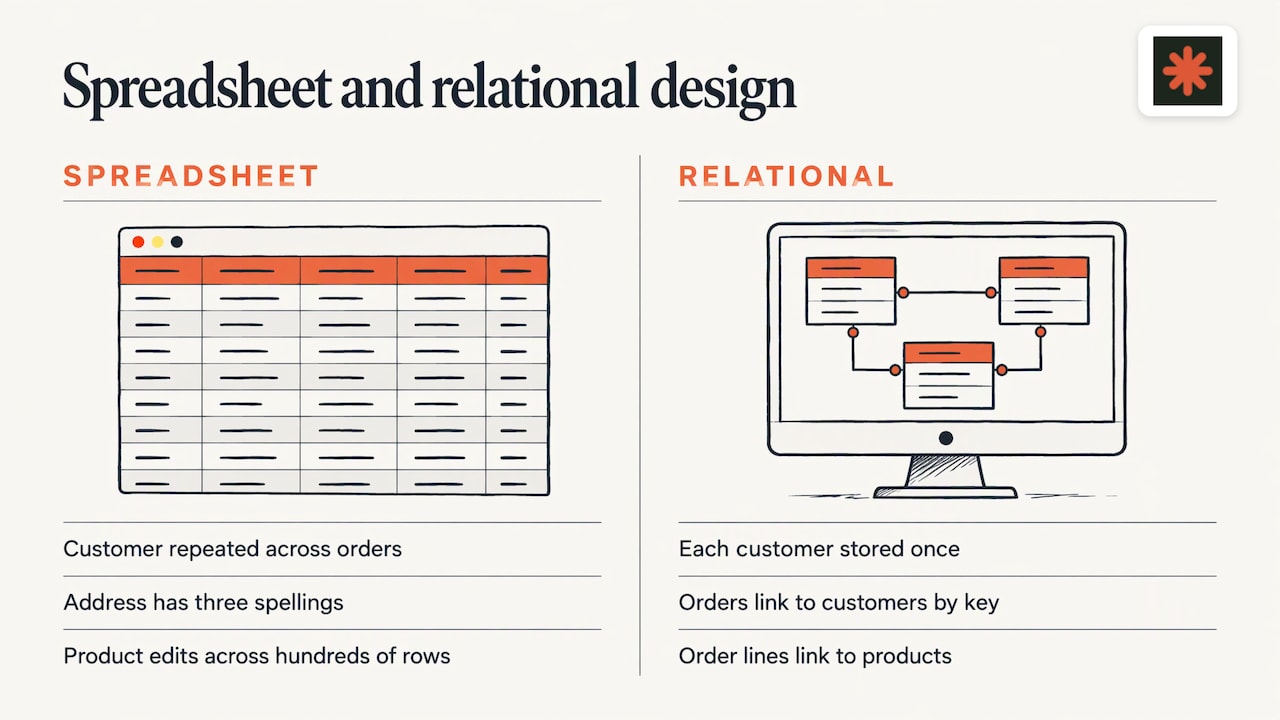
Imagine a small e-commerce business tracking orders in one spreadsheet, one row per order, with customer name, address, product, quantity and status typed in each time. A repeat customer appears twenty times, with three spellings of their address. A change to a product’s name means editing hundreds of rows.
A relational design separates this into linked tables: customers, products, orders and order lines. Each customer is stored once and referenced by a key. Each order links to its customer and to one or more order lines, and each order line links to a product. Change the product name once and every order reflects it. That is what OpenStax means by eliminating redundancy, and it is the difference between a list and a system.
From there, automation becomes straightforward. When an order status changes, a message goes to the customer. When stock falls below a set level, a purchase task appears. Those workflow automations are only as reliable as the structure underneath them, which is why we treat the data model and the automations as one piece of work. You can see this thinking applied to order handling in our order to dispatch project and to an education setting in From enquiry to booking.
Choosing the type of database
The best-known split is between relational and non-relational systems. Cambridge University’s databases course notes classify databases by data model: relational (tables of rows and columns linked by keys), document (self-contained JSON documents) and graph (vertices joined by edges), plus specialised stores for time series, vectors, geospatial and scientific data. The same notes say the relational model was introduced by Codd in 1970 and has been the most popular since the 1980s.
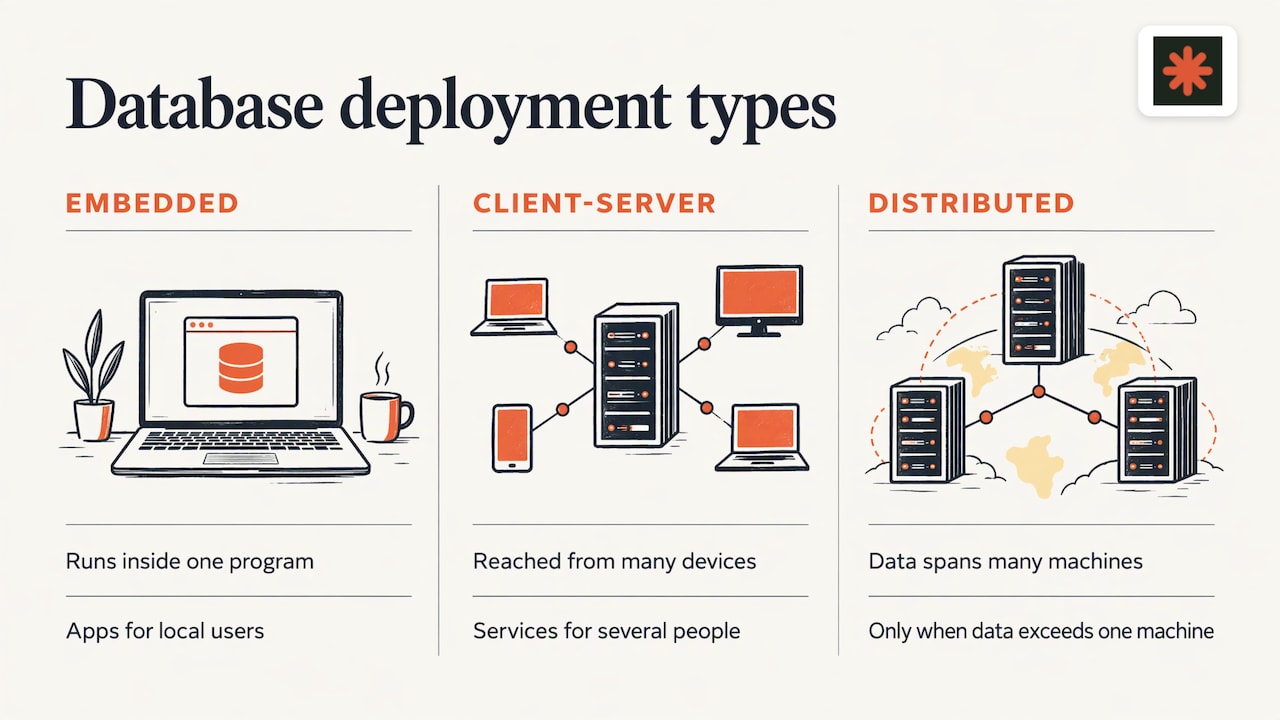
The notes also distinguish where a database runs. Embedded databases run inside a single program and suit apps for local users. Client-server databases suit services reached from many devices. Distributed databases spread data across many machines and are needed only when the data is too large for one.
For most operational businesses, the answer sits in the middle of that list: a client-server relational structure, accessed by several people and connected to other tools. Orders, stock, enquiries, bookings and students all have well-defined fields and clear relationships between them, which is what relational design handles well.
Questions that decide the choice
UK business guidance from Northern Ireland’s business advice service says the right database depends on the type of data, the structure needed, where it will be stored, how it will be accessed and what it will be used for, as well as the consistency required and the reporting features needed. It also notes that sectors such as manufacturing, publishing and finance have databases tailored to their needs. Turn that into five questions for your own business:
- What are you recording? Mostly structured fields (names, quantities, dates, statuses) point to relational tables. Free-form documents point elsewhere.
- Who will use it? A system touched by ten people across a warehouse and an office needs sensible permissions and screens, not just storage.
- How consistent must it be? If two people must never allocate the same stock item, you need transactional integrity. TechTarget notes that relational systems support ACID properties, which ensure a transaction either completes correctly or the database returns to its previous state.
- What must it connect to? Some platforms are dictated by other software. Red Gate’s 2024 research notes that, for instance, WordPress uses MySQL by default and some accounting packages only run on a SQL Server and Windows stack.
- Who will look after it? A database that nobody on your team can adjust becomes a liability. Ownership after launch is a design requirement, not an afterthought.
The tool should follow from those answers. We build with Airtable, Node.js, APIs, n8n and Make, among other tools, because for the operational systems our clients need they give a structured relational-style base, flexible interfaces and dependable integrations without the overhead of heavy infrastructure.
Testing, security and the UK rules that apply
A database holding customer or student details is subject to UK data protection law. This section gives the points a business owner needs; for a specific legal question about your own processing, speak to a data protection adviser or solicitor.
Testing
The Open University describes testing as two questions: validation (have we built the right database?) and verification (is it implemented correctly, including security, backup, recovery and audit trails?), applied throughout development rather than at the end. For an operational system, test with real scenarios: a duplicate customer, a refund after dispatch, a student who withdraws, a missing postcode. If the system cannot cope with those in testing, it will not cope on a busy Monday.
What UK GDPR expects
Article 32 of the UK GDPR requires controllers and processors to put in place appropriate technical and organisational measures, including pseudonymisation and encryption of personal data, ongoing confidentiality, integrity, availability and resilience, timely restoration after an incident, and a process for regularly testing and evaluating how effective those measures are. The wording was amended by the Data (Use and Access) Act 2025, in force from 20 August 2025, so that adherence to an approved code of conduct can be used to demonstrate compliance.
In plain terms, for your database that means:
- people see only the records their role needs (access permissions);
- personal data is held only as long and as widely as needed;
- backups exist and you know the restore works;
- someone checks all of this on a schedule, not once.
A useful benchmark for backups and ownership
The Department for Work and Pensions published a database security standard, SS-005, dated 22 January 2026. It is written for government systems, so it is a benchmark rather than a requirement for a small business, but its minimum measures are sensible for any organisation: an inventory of every database instance, named data and system owners, data classification, and patching before deployment. It also calls for regular backups with verified restore capability. “Verified” is the important word: a backup nobody has restored is an assumption.
Maintenance: where systems quietly succeed or fail
RelationalDBDesign.com’s course material notes that maintenance and evolution is often the longest stage of the life cycle for a well-used database. Your business changes: new products, a new course, a second warehouse. MariaDB’s documentation describes the operation and maintenance stage as covering changes in response to new requirements or heavier load.
That is why handover matters. A system that only its builder understands is a risk. Our projects include practical documentation, exception handling and handover, so your team knows how the system works, what it does when something unusual happens and who does what. Where a client wants ongoing support, we offer optional monthly care plans.
What to ask before you commission a build
Whoever you hire, these questions separate a working system from a pretty one:
- How will you map our current process before designing anything?
- Which records and statuses will the system hold, and who can change each?
- What happens to an order, booking or job that does not follow the normal path?
- How will existing data be cleaned and loaded?
- Where is the documentation, and who can change the system after handover?
- How are backups taken, and when was a restore last tested?
- How will personal data be protected in line with UK GDPR?
A developer who answers these in terms of your workflow, not in terms of a technology, has understood the job.
How we approach it
We combine operational experience with hands-on development. We map the work first, then build the systems, integrations and interfaces around the people who use them. Our operations systems, workflow automation and web development work serves e-commerce, education and logistics organisations, and you can see examples in our portfolio, including the systems behind the stock and an operating system for direct-to-consumer sales.
If you run a local trade or service business and enquiries are slipping through, our fixed-price Never miss a job setup is £395 one-off, with an optional care plan at £35 per month. For larger operational systems, automations and websites we scope each project individually: start from our main page and tell us what you are trying to run.
If the enquiry data you collect includes personal details, our privacy and cookies page shows how we describe that handling on our own enquiry forms.
FAQ
What is database development?
It is the process of analysing what a business needs to record, designing a data model and building the structured system that stores and manages it. It runs from requirements through design, build and testing into ongoing maintenance. The aim is accurate information that the right people can reach easily.
How long does a database project take?
It depends on how many processes the database must support and how clean your existing data is. A single workflow such as enquiries or orders is far quicker than a system covering stock, production and dispatch together. A scoped plan after the requirements stage gives you a realistic timeline for your case.
Do I need a relational database?
If your information is structured and linked, such as customers, orders, products and bookings, a relational structure is the natural fit. The relational model has been the most widely used since the 1980s, according to Cambridge University’s course notes. The right choice also depends on what the database must connect to and who will maintain it.
Does UK GDPR apply to my business database?
Yes, if it holds personal data about customers, students or staff. Article 32 requires security measures appropriate to the risk, including the ability to restore data and regular testing of those measures. For advice on your specific situation, speak to a data protection adviser or solicitor.
Sources
- The database development life cycle (Open University, OpenLearn)
- The database development life cycle, testing section (Open University, OpenLearn)
- Practical applications of database design and management (OpenStax)
- Database lifecycle (MariaDB documentation)
- Design strategy, tools and database life cycle (RelationalDBDesign.com)
- Databases course notes 2026/27 (University of Cambridge)
- Which is the best database for your business? (nibusinessinfo.co.uk)
- Different types of database management systems explained (TechTarget)
- Database platforms, state of the database landscape 2024 (Red Gate)
- UK GDPR, Article 32 (legislation.gov.uk)
- Technical Security Standard SS-005 for database management systems (DWP, GOV.UK)